BustaAI
BustaAI: one chat for Cursor, Codex and OpenAI agents
A unified chat for AI coding agents inside BustaCode, with Ask, Plan and Agent modes and a consistent interface across supported providers.
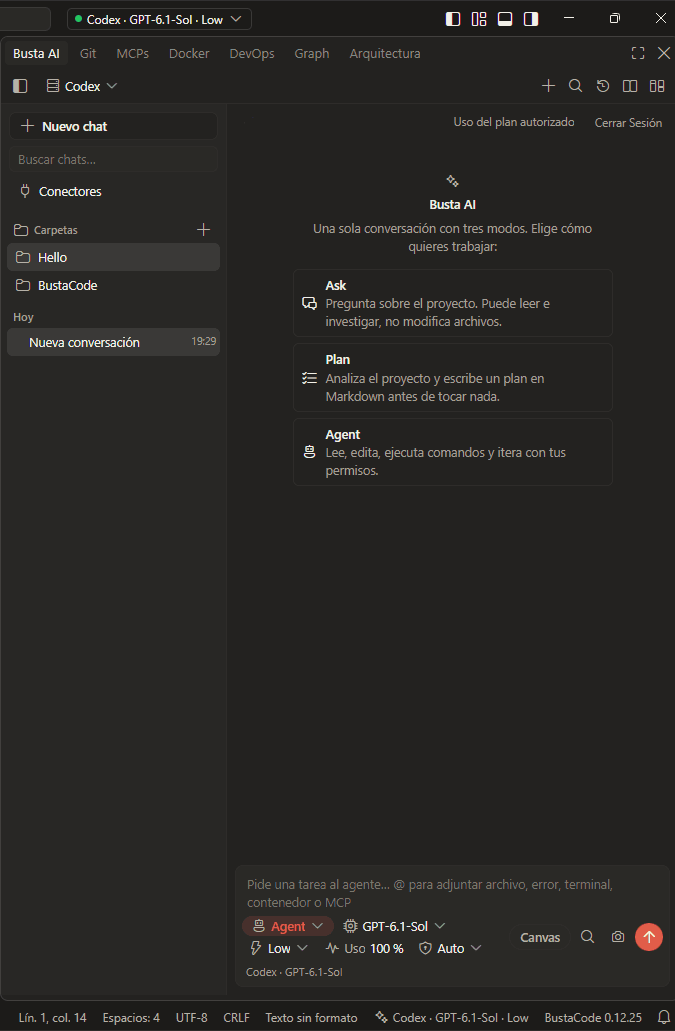
Three modes, one conversation
The panel greets you with the same choice every time: one conversation, three ways to work. These are the in-app descriptions of each mode.
-
Ask
Ask about the project. It can read and research, but it doesn’t modify files.
-
Plan
Analyses the project and writes a plan in Markdown before touching anything.
-
Agent
Reads, edits, runs commands and iterates within your permissions.
Cursor, Codex and the OpenAI API
BustaAI gives supported providers one interface, but it doesn’t replace their engines: each provider uses its own execution engine.
-
Cursor
Integrated through Cursor’s official CLI and ACP.
-
Codex
Integrated through the Codex app-server.
-
OpenAI API
Direct OpenAI API integration.
Model availability, account requirements and capabilities depend on the provider. Cursor and Codex integrations rely on their respective official tools and authentication.
The composer
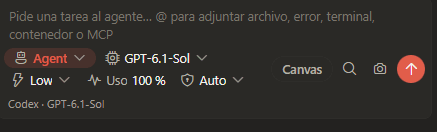
- Describe a task and type @ to attach a file, an error, a terminal, a container or an MCP.
- Pick the mode (Ask, Plan or Agent) and the model right from the composer.
- The active provider and model are also shown in the status bar — for example “Codex · GPT-6.1-Sol” in the screenshot.
Project memory
Structured, editable context with what the agents need to know about the project.
- Project goals
- Decisions
- Instructions
- Relevant files
- Git state
Parallel conversations
Run multiple agent chats in tabs, each with its own status indicator and conversation history. The sidebar lets you start a new chat, search past chats and browse them by folder.
Privacy and approvals
- Project context and BustaAI’s local state are managed on your device.
- Relevant context is sent to the selected AI provider when you make a request; your provider’s policies also apply.
- Tool execution and permissions depend on the selected agent engine. BustaAI presents approval requests and activity information where supported.
Frequently asked questions
Which AI providers does BustaAI support?
BustaAI integrates with Codex, the official Cursor CLI over ACP, and the OpenAI API. Model availability, account requirements and capabilities depend on the provider.
Do I need a Cursor or Codex account?
Yes, to use those providers. Provider accounts, API keys, subscriptions and usage limits are separate from BustaCode, and the Cursor and Codex integrations rely on their official tools and authentication.
Is BustaAI free?
BustaCode, including BustaAI, is free to download. AI provider subscriptions, credits, APIs and usage limits are independent and may involve separate charges.
Does BustaCode send my code to its servers?
Project context is maintained locally by BustaCode, but the relevant context and instructions are sent to the selected AI provider when you make a request. Your provider’s policies also apply.
Related features
All features- BustaAgents An agent-focused view of the same window: chat, track work and review changes, then return to the editor without losing the conversation.
- MCP, tools & extensions Project-level MCP through a local gateway with access controls, tool approvals, and Open VSX / VSIX extensions.
- Git & worktrees Diffs, changes, branches, history, worktrees and pull-request workflows, in both the IDE and BustaAgents.
Get started
Try it in BustaCode
Free to download for Windows x64. Provider accounts, API keys, subscriptions and usage limits are separate.
v0.12.27 · Windows x64 · 188 MB installer · Changelog
- 1
Download the latest Windows installer.
- 2
Install BustaCode and open a project.
- 3
Open BustaAI, connect a supported provider and switch between BustaCode and BustaAgents.